6 min read1,291 words
GMO breach, part 3: Japanese companies collect personal data they don't need
Japanese services routinely ask for personal information they have no use for: a login to unsubscribe, an email address for station Wi-Fi, a birthday on a signup form. A company that collects data it does not need is still responsible for protecting it, and losing it is negligence.
I spent an evening unsubscribing my father from marketing email. Many of the senders wanted him to log in first. In the same month, the free Wi-Fi at a station asked me for my email address and then carried my traffic unencrypted, so anyone nearby could see which sites I visited, and a signup form asked for my date of birth to sell me something that had nothing to do with my age. None of the 3 needed what it asked for, but each is now responsible for protecting it, and losing it would be negligence. GMO Internet's case last month, in which a default setting gave its service access to files on customers' own PCs, is the extreme version of the same habit.
Log in to unsubscribe#
A phishing email is a fake message dressed up as your bank or another service you use, and what it wants is for you to follow a link and type a password. An unsubscribe link that leads to a login page asks you to do exactly that. It also fails the standard Gmail now enforces. Since February 1, 2024, anyone sending more than 5,000 messages a day to Gmail addresses has had to support one-click unsubscribe, a standard way of putting an unsubscribe button in the mail program itself, so that leaving a list takes one action and no login.[1]
My own bank does the same. The unsubscribe link at the bottom of MUFG Bank's marketing email opens a page that tells you to log in to internet banking and find the setting yourself.
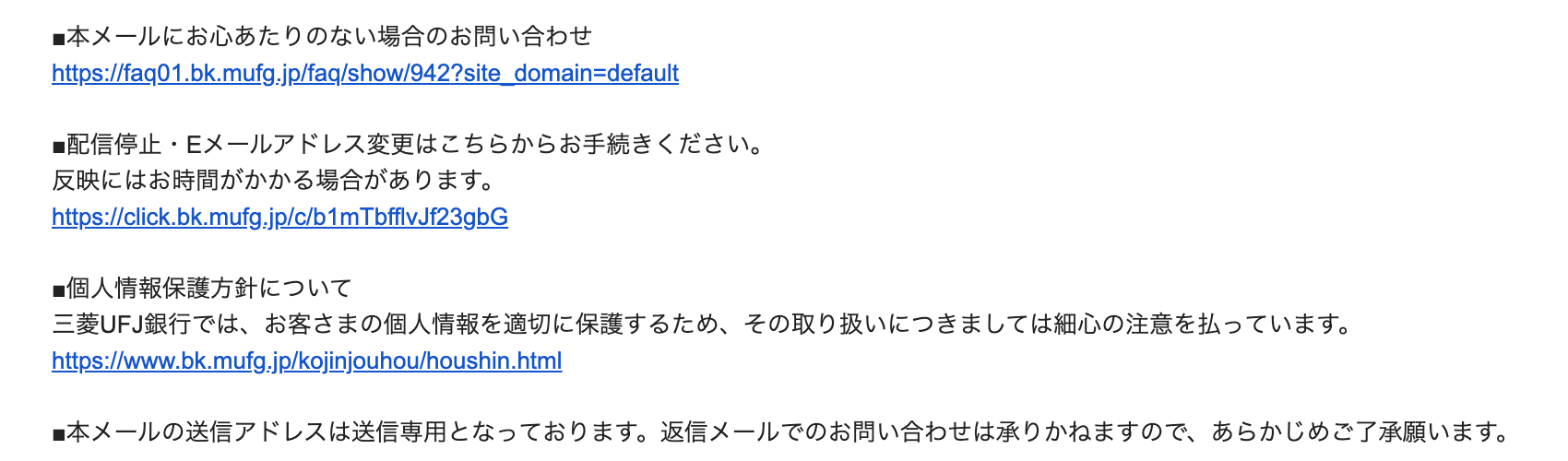
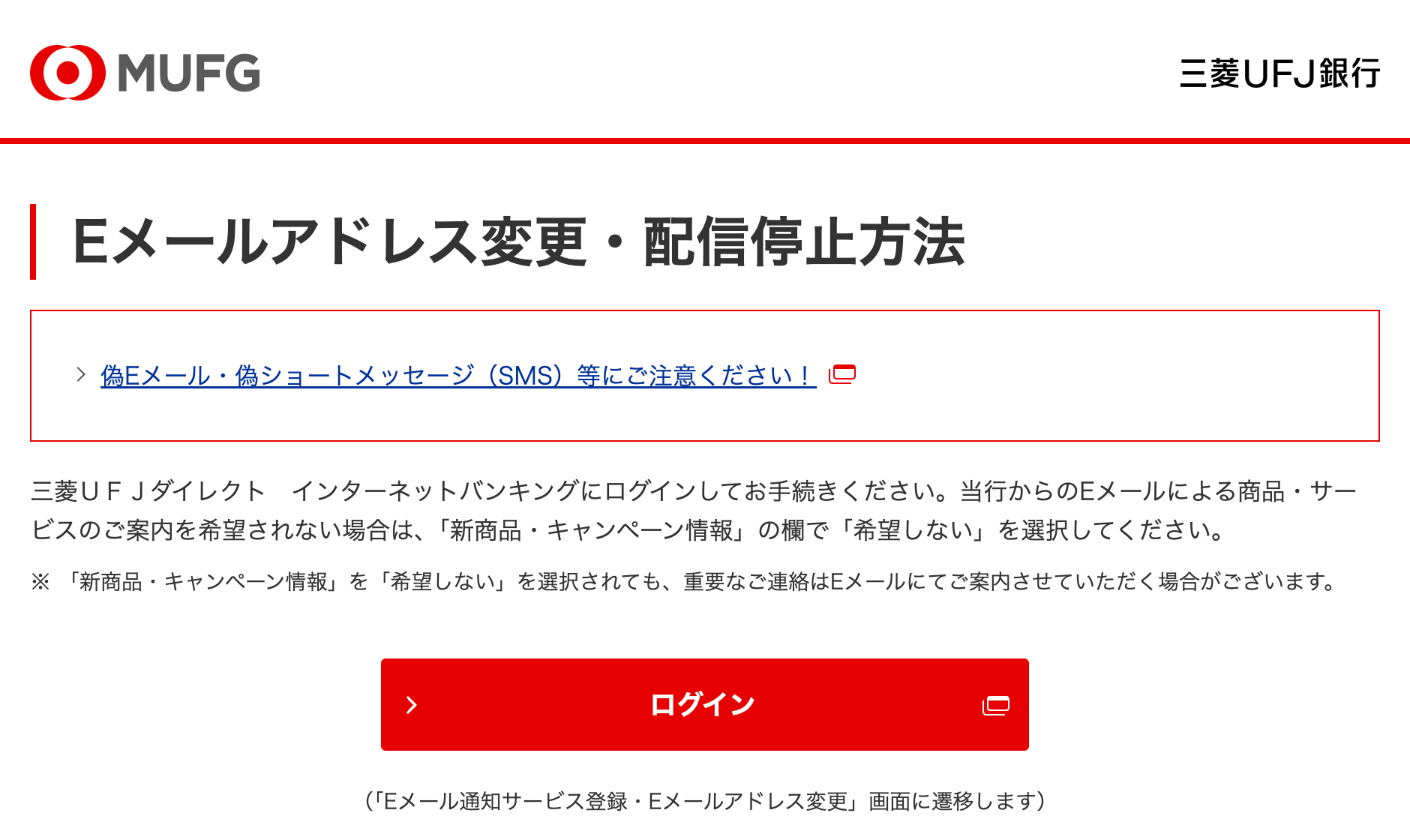
The gentler version of the same thing is the unsubscribe link that only works inside an app. One of my father's senders, a payments company, pointed its unsubscribe link at a paypay:// address that opens the company's app. It works on a phone, but on the Windows PC he reads his mail on, the link opened a blank page with a browser warning. The link first passed through the company's tracking server, and that server still used an unencrypted web address, the kind browsers now flag, so he gave up and went back to his inbox.
Public Wi-Fi collecting user information while unencrypted#
Free public Wi-Fi in Japan often won't connect you until you give it an email address or sign in with another account, though the network needs neither. The government recommends it: the Ministry of Internal Affairs and Communications' guideline for public Wi-Fi operators, last revised in September 2019, says that free hotspots for the general public should confirm who the user is, with a verified phone number, a verified email address or an existing online account.[2] That teaches people to type personal details into whatever page a hotspot shows them. Anyone can set up a network with the same name as a station's, show a copy of its sign-in page, and collect the email addresses and phone numbers people enter.
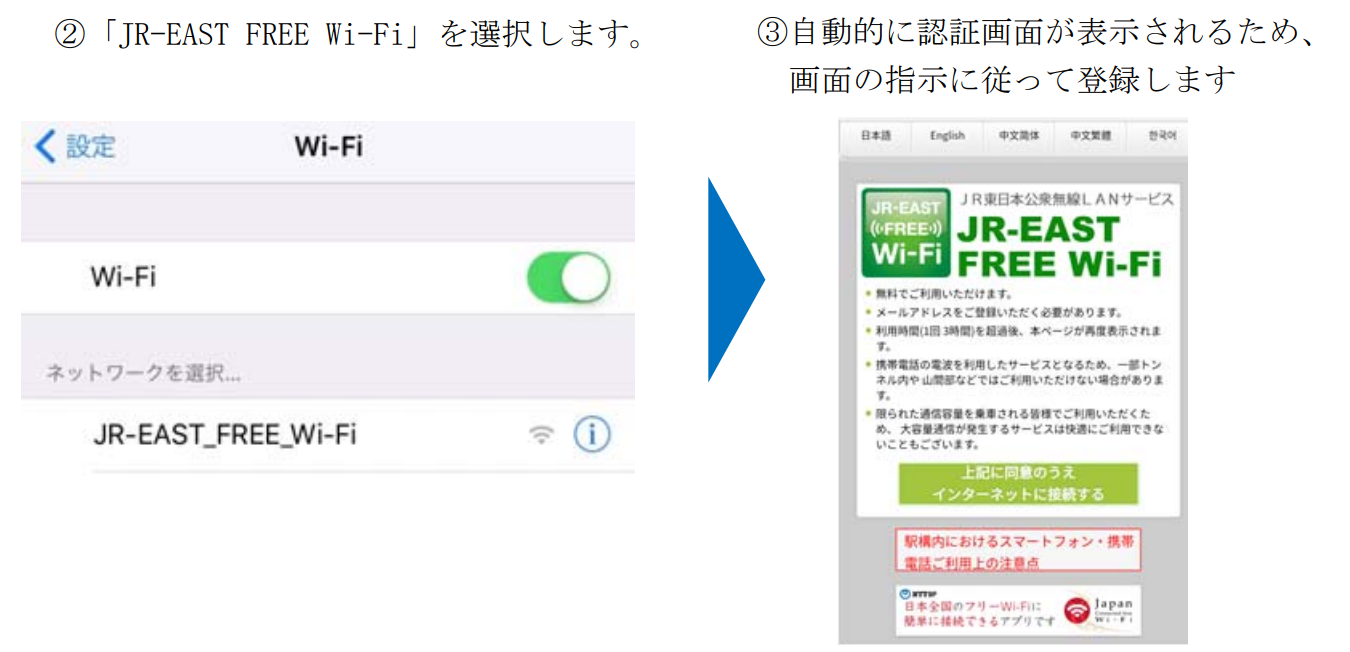
From JR East's own setup guide for its free Wi-Fi, 2018: the network carries no padlock, and the login page says an email address must be registered.[8]
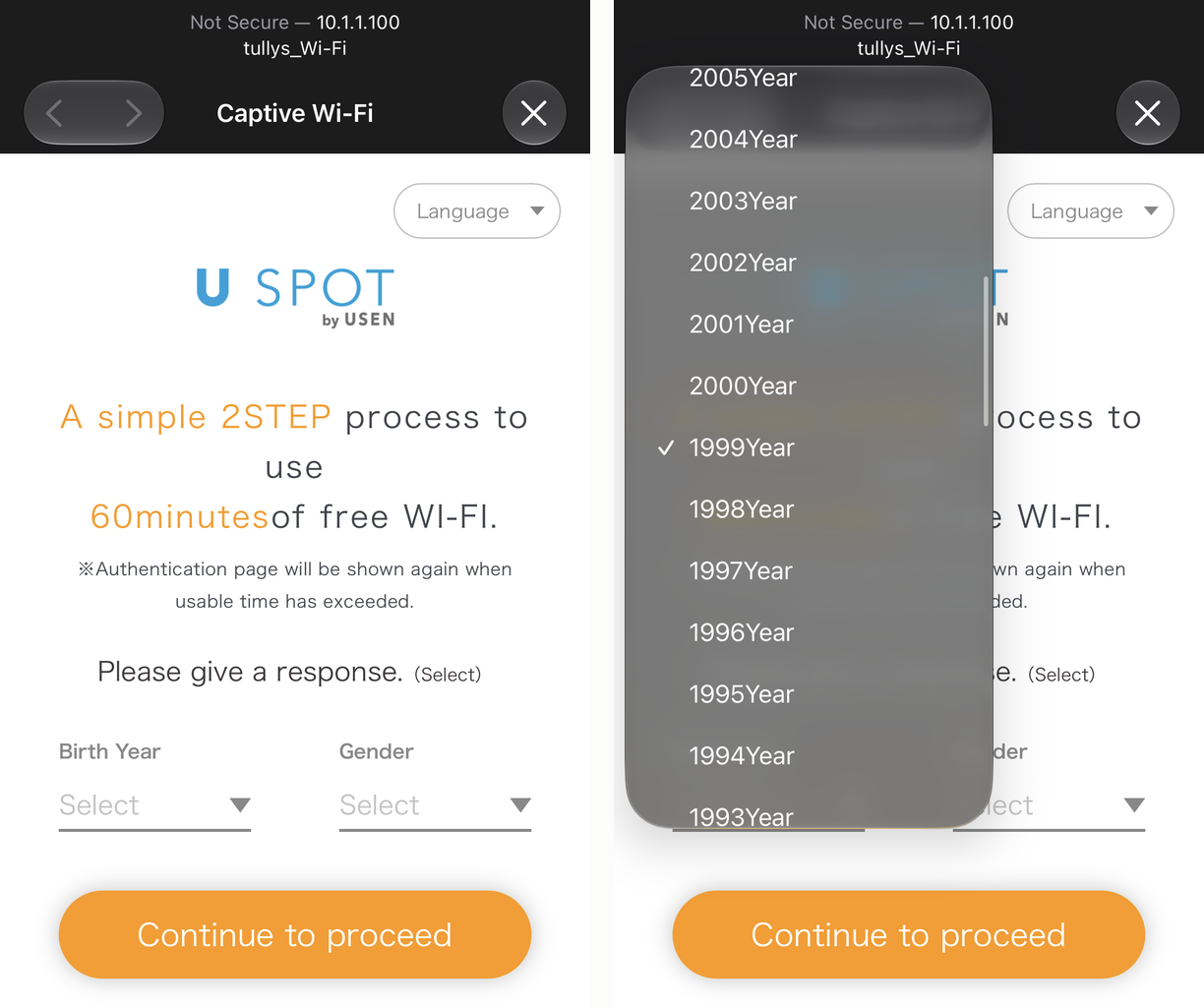
Café Wi-Fi asks for more. The login page for the free Wi-Fi at a Tully's Coffee, run by USEN, will not connect until I give my birth year and sex. My phone marks the page itself as not secure.
The same guideline, in its section on security measures, says operators should install equipment that can encrypt the connection and check who is connecting, and should tell users to look for the padlock in the browser when exchanging important information.[2] In my experience operators check who you are, as the guideline recommends, and skip the encryption. A way of encrypting an open network, with no password to type, has existed since 2017.[3] The Wi-Fi Alliance, the industry body behind the Wi-Fi label, has certified it since June 2018 under the name Enhanced Open.[4] A user connects exactly as before; the difference is that nobody on the same network can read the traffic. I have yet to connect to a public network in Japan that uses it.
What an open network exposes#
Most websites now encrypt the connection between you and them, the padlock in the address bar, so someone on the same open network cannot read your banking session. What someone on the same network can still do:
- The step where your device asks which server a website lives on is usually unencrypted, so the list of sites you visit is visible.
- Links to pages without the padlock, like the tracking link in my father's email, can be read and altered on the way.
- The sign-in page the Wi-Fi shows before it connects you is easy to fake, because the real one has no encryption to tell it apart from a copy.
- An attacker can set up a Wi-Fi network with the same name, and on an unencrypted network nothing tells your phone the difference.
Enhanced Open closes the first 2 gaps and does nothing about the last 2. Turning it on is a setting in the Wi-Fi router's software, where the hardware supports it.
Birthdays on signup forms#
Signup forms in Japan ask for a great deal: full name in kanji and again in kana, date of birth, sex, postal address, and a phone number, for services that will only ever send an email. Each field is something the company then has to protect. Many of these services sell nothing and have no age limit, yet the date of birth is still a required field. Why do they need it?
What the law requires#
In Europe this habit is illegal in principle. The EU's privacy law, the GDPR, requires that personal data be "adequate, relevant and limited to what is necessary in relation to the purposes for which they are processed", and names the principle: data minimisation.[5] Infringing it is one of the violations that carries the top tier of fines, up to 4% of worldwide turnover.[7]
Japan's Act on the Protection of Personal Information has no equivalent sentence. Article 17 requires a business to state its purpose for using the data, and Article 18 forbids using the data for anything outside that purpose.[6] Both limit use against a purpose the company writes for itself; neither limits how much it may collect in the first place. A company that writes "to provide and improve our services" as its purpose and then asks for your birthday has complied.
What companies should do#
The fix is the company's job, not the customer's. Ask only for what the service uses. An unsubscribe link should stop the email with no login. Public Wi-Fi should connect people without asking who they are, and encrypt the connection with Enhanced Open where the equipment supports it. A service with no age limit has no reason to make the date of birth a required field.
References#
- Google, Email sender guidelines, Gmail Help. Requirements for senders of more than 5,000 messages a day, in force from February 1, 2024; one-click unsubscribe per RFC 8058.
- 総務省, 無線LANビジネスガイドライン, first issued June 25, 2013, last revised September 6, 2019. Section 3.2.1 on security measures; the appendix on confirming user information.
- IETF, RFC 8110: Opportunistic Wireless Encryption, March 2017.
- Wi-Fi Alliance, New program enhances protections, maintains ease-of-use on open Wi-Fi, June 2018.
- Article 5 GDPR, Principles relating to processing of personal data, paragraph 1(c).
- Japanese Law Translation, Act on the Protection of Personal Information (Act No. 57 of 2003), Articles 17 and 18.
- Article 83 GDPR, General conditions for imposing administrative fines, paragraph 5.
- JR East, 新幹線での訪日外国人のお客さまに向けた無料公衆無線LANサービスの開始について, May 2018, section 2, Wi-Fi settings.